Showing posts with label tools. Show all posts

Thursday, July 28, 2011

AdbCommandRejectedException!

Sometimes, adb goes crazy on my Win7. If I open 'ddms' (to view logcat messages), I wont see any messages at all! If I look into the 'Command Window', I see the above exception being raised in it. Apparently, the work-around this is to do the following:
  1. Un-plug the USB cable.
  2. Kill the adb-server (adb kill-server)
  3. Start the adb-server (adb start-server)
  4. Plug in the USB
 Hope this helps!

Friday, June 17, 2011

CorrDim: a fast correlation dimension evaluator

After going through this blog written by Bill Maier, I thought why not I give a shot in writing a C++ program to find the correlation dimension and figure out its performance. 'CorrDim' is the result of this. This has some of the most common maps already available within the project folder viz: Logistic map, Tent map and Henon map. Also, adding a map of your choice is a piece of cake, thanks to virtual inheritance. Go through the 'README' file available in the source code to know more on how build and extend this to include more maps. This program supports 2 modes of correlation dimension evaluation:
  1. Fast but huge memory: In this mode, the distance matrix will be evaluated apriori so that the subsequent lookups are faster. However, this requires huge memory, especially if the number of elements considered is huge.
  2. 'Relatively' fast but consumes little memory: In this mode, the distance matrix will be evaluated on-the-fly, during the evaluation of the correlation dimension, thus requiring very little memory.
The choice of the mode depends on: If you absolutely cannot sacrifice even a little performance, then you should use the normal version. But for all practical purposes, it is recommended that you use the low-memory version.

Profiling:
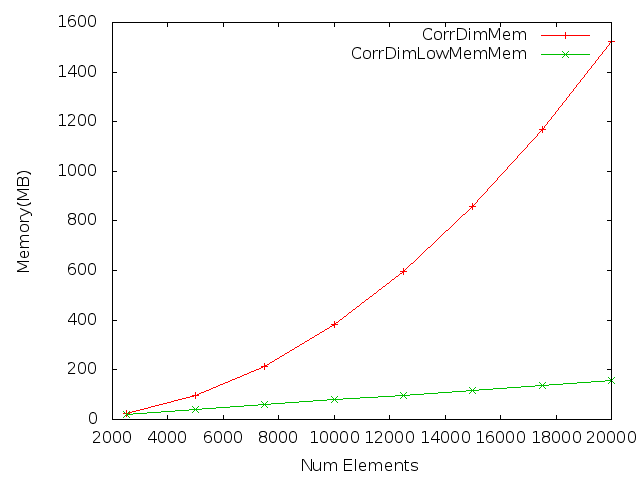
Here are the results from profiling this program [Results are on a Dell-Latitude E6400, with Ubuntu 10.10 installed and on LogisticMap.]...

Memory Profiling:

Run-time profiling:

As you can see, the LowMemory version of this program gives a significant reduction in memory footprint compared to its counterpart. At the same time, the performance loss is also not that noticeable.

I have hosted this project (open-source'd with GPL) on github at: git@github.com:teju85/CorrDim.git.

Wednesday, June 8, 2011

Replacing tabs with spaces in eclipse

Tabs are evil! They are interpreted differently by different editors. So, it is always better to setup your editor to replace tabs with a constant number of spaces. IMO, 4 spaces will be visually appealing. While working with eclipse, here's how to set this property: (assuming eclipse version "Helios Service Release 2")
Window -> Preferences -> Java -> Code Style -> Formatter -> New
Give your profile a name, something like 'Eclipse [only-spaces]' and inherit all the basic settings from the 'Eclipse [built-in]' profile. (You can choose to inherit from whichever other profile of your interest or you can directly edit one of your favorite profiles. For me, the built-in profile was sufficient). Also make sure that 'Open the edit dialog now' is checked in and then press 'Ok'.
In the dialog box which opens, select Indentation -> Tab policy -> Spaces only.
Set the 'Indentation size' and 'Tab size' to 4. (meaning 4 spaces, as I mentioned in the beginning).
Press Apply to save all your settings and from here onwards, eclipse will put spaces instead of tabs for the indentation!

The reason I created a new profile is because one can keep re-using this in all your future projects and also has the ability to export your profiles when you want to use this profile on some other machine!

Monday, June 6, 2011

Neat trick to replace spaces with any other character in Makefile

Sometimes, you would want to replace spaces in a string with another character (for this post let's assume that this character is a colon ':'. You can replace it with whatever replacement string you desire). The following makefile trick serves this purpose:
null      :=
SPACE     := $(null) $(null)
WITHSPACE := A string with spaces
REPLACED  := $(subst $(SPACE),:,$(WITHSPACE))
default:
 @echo WITHSPACE = $(WITHSPACE)
 @echo REPLACED = $(REPLACED)
And here's the output:
$ make
WITHSPACE = A string with spaces
REPLACED = A:string:with:spaces

Sunday, June 5, 2011

Accessing linux ext file-systems on win7

If you want to access only 'ext2' file systems:
'ext2ifs' is a very cool program to access the linux ext2 file-systems from windows. However, this works only on winXP or Vista, but not on Win7. No problem! win7 supports a compatibility mode where one can the programs on XP or Vista. To do so, right click on the exe of your interest (which you want to run under compatibility mode) -> Properties -> Compatibility. Check the box 'Run this program in compatibility mode for:' and select the windows version. After this, click 'Apply' to save your changes and you are done! The next time you run this exe, it'll automatically run under the mode for the appropriate windows version you selected above.

If you want to access an 'ext3/4' file systems: (read-only access)
There's a nice utility called linux-reader. This can provide read-only access to ext2/3/4, HFS and RaiserFS file systems! But, as mentioned above, it provided read-only access.

If you want to access an 'ext3' file system (both read/write access)
Utility called 'ext2fsd' is a solution for this case. However you have to install this exe and run it as administrator. To do so: right click on the exe to run -> 'Run as administrator'. This is an awesome utility and a plus point about it is that it doesn't require it's own explorer unlike the 'linux-reader' utility! Once you have assigned a drive letter to the volume of your interest, you can directly access them using the windows native explorer!

Monday, April 18, 2011

cutop: GPU version of 'top'

Here's a tool I wrote today for for mimicking the functionality of the famous unix tool 'top'. The idea is to give the user the capability to monitor how the resource usage is going on in the GPU's. Currently, this tool does not do much, but only monitors the memory usage of the GPU's. In the future releases of this tool, I'm planning to add more functionalities. Ofcourse, assuming that I get hold of the NVML API as soon as possible! (fingers crossed). 

But till then, I've hosted the project over github and you can access the source code from here: (read-only) 'git://github.com/teju85/cutop.git'.

Saturday, January 1, 2011

Removing password from pdf files

We frequently come across a lot of password-protected pdf's in our daily lives, be it our internet/credit-card bills. Problems come when we want to share these kind of files with others. We obviously don't want to share the password as well! There are a lot of (commercial!?) tools out there which claim to remove password from pdf files. However, we all know that ghostscript already provides an option of reading password-protected pdf files and then storing them back to hard-disk. So, wrote a wrapper-tool for myself in order to do this process for me. I've created a repo for this tool and is publicly available (for free, ofcourse!). If you want to use this tool, please download all the files from this repo: git://github.com/teju85/No-Pass.git.

Happy new year fellas!